List all Transactions with Trueloyal Generated Member ID

Recent Requests
Log in to see full request history
TimeStatusUser Agent
Retrieving recent requests…
LoadingLoading…
Path Params
string
required
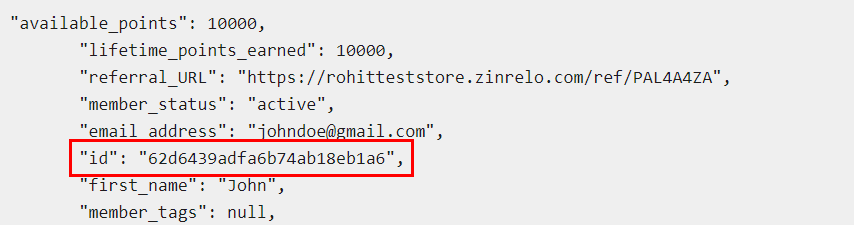
Defaults to 62d6439adfa6b74ab18eb1a6

Add Zinrelo generated member ID.

Query Params
int32

Defaults to 0. This is a cursor for use in pagination. start_index is the index that defines your place in the list. For instance, if you make a list request and receive 1000 objects, your subsequent call can include start_index=1001 in order to fetch the next page of the list.

int32

Defaults to 100. This is a limit on the number of objects to be returned. Count can range between 1 and 1000, and the default is 100.

string
Defaults to {"eq":"01/21/2022"}

This can be used to filter the list of transactions based on their approved_date in Zinrelo. Child parameters are:

p>To filter dates 'equal to' a particular date, use operator "eq". Example: approved_date={"eq":"01/21/2022"}

To filter dates 'greater than' a particular date, use operator "gt". Example: approved_date={"gt":"01/21/2022"}

To filter dates 'greater than or equal to' a particular date, use operator "gte". Example: approved_date={"gte":"01/21/2022"}

To filter dates 'lesser than' a particular date, use operator "lt". Example: approved_date={"lt":"01/21/2022"}

To filter dates 'lesser than or equal to' a particular date, use operator "lte". Example: approved_date={"lte":"01/21/2022"}

To filter dates 'between' a particular date, use operator "between". Example: approved_date={"between":"12/01/2021-12/31/2022"}

Note: Our API records all date and time fields in UTC time.

string
Defaults to {"gt":"01/21/2022"}

This can be used to filter the list of transactions based on their created_date in Zinrelo. Child parameters are

p>To filter dates 'equal to' a particular date, use operator "eq". Example: created_date={"eq":"01/21/2022"}

To filter dates 'greater than' a particular date, use operator "gt". Example: created_date={"gt":"01/21/2022"}

To filter dates 'greater than or equal to' a particular date, use operator "gte". Example: created_date={"gte":"01/21/2022"}

To filter dates 'lesser than' a particular date, use operator "lt". Example: created_date={"lt":"01/21/2022"}

To filter dates 'lesser than or equal to' a particular date, use operator "lte". Example: created_date={"lte":"01/21/2022"}

To filter dates 'between' a particular date, use operator "between". Example: created_date={"between":"12/01/2021-12/31/2022"}

Note: Our API records all date and time fields in UTC time.

string
Defaults to {"gte":"01/21/2022"}

This can be used to filter the list of transactions based on their last_modified date in Zinrelo. Child parameters are:

To filter dates 'equal to' a particular date, use operator "eq". Example: last_modified_date={"eq":"01/21/2022"}

To filter dates 'greater than' a particular date, use operator "gt". Example: last_modified_date={"gt":"01/21/2022"}

To filter dates 'greater than or equal to' a particular date, use operator "gte". Example: last_modified_date={"gte":"01/21/2022"}

To filter dates 'lesser than' a particular date, use operator "lt". Example: last_modified_date={"lt":"01/21/2022"}

To filter dates 'lesser than or equal to' a particular date, use operator "lte". Example: last_modified_date={"lte":"01/21/2022"}

To filter dates 'between' a particular date, use operator "between". Example: last_modified_date={"between":"12/01/2021-12/31/2022"}

Note: Our API records all date and time fields in UTC time.

string
Defaults to {"lte":"01/21/2022"}

This can be used to filter the list of transactions based on their points_expiration_date in Zinrelo. Child parameters are:

To filter dates 'equal to' a particular date, use operator "eq". Example: points_expiration_date={"eq":"01/21/2022"}

To filter dates 'greater than' a particular date, use operator "gt". Example: points_expiration_date={"gt":"01/21/2022"}

To filter dates 'greater than or equal to' a particular date, use operator "gte". Example: points_expiration_date={"gte":"01/21/2022"}

To filter dates 'lesser than' a particular date, use operator "lt". Example: points_expiration_date={"lt":"01/21/2022"}

To filter dates 'lesser than or equal to' a particular date, use operator "lte". Example: points_expiration_date={"lte":"01/21/2022"}

To filter dates 'between' a particular date, use operator "between". Example: points_expiration_date={"between":"12/01/2021-12/31/2022"}

Note: Our API records all date and time fields in UTC time.

string

This filter will return the point status.

The value can be passed as:

eq: Accepted values are ‘approved, rejected, pending, redeemed, deducted, expired’. Pass the value of the status to get a list of all transactions with points_status equal to the value passed.

For example- {"eq":"approved"}

in: Pass a single string which may contain one status or multiple statuses separated by comma to get a list of all transactions whose points_status is one of the values passed.

For example- {"in":"approved, rejected"}

string

This filter will return transaction status.

eq: Accepted values are Approved/ Rejected/ Pending.

For example- {"eq":"approved"}

in: Pass a single string which may contain one status or multiple statuses separated by comma to get a list of all transactions whose points_status is one of the values passed.

For example- {"in":"approved, rejected"}

string
Defaults to english

One of the store languages, for example english/ italian/ german, etc.

Responses

Language
Credentials
LoadingLoading…
Response
Click Try It! to start a request and see the response here! Or choose an example:
application/json